Upgrade to EFG Digital Key

Instructions for clients already using the digital channel

Step-by-step guide to setting up EFG Digital Key

If you already use the digital channel, you can follow the steps below to upgrade to EFG Digital Key. Please note, you need to be able to log in to the digital channel on a desktop or tablet to perform the upgrade.

Step 1
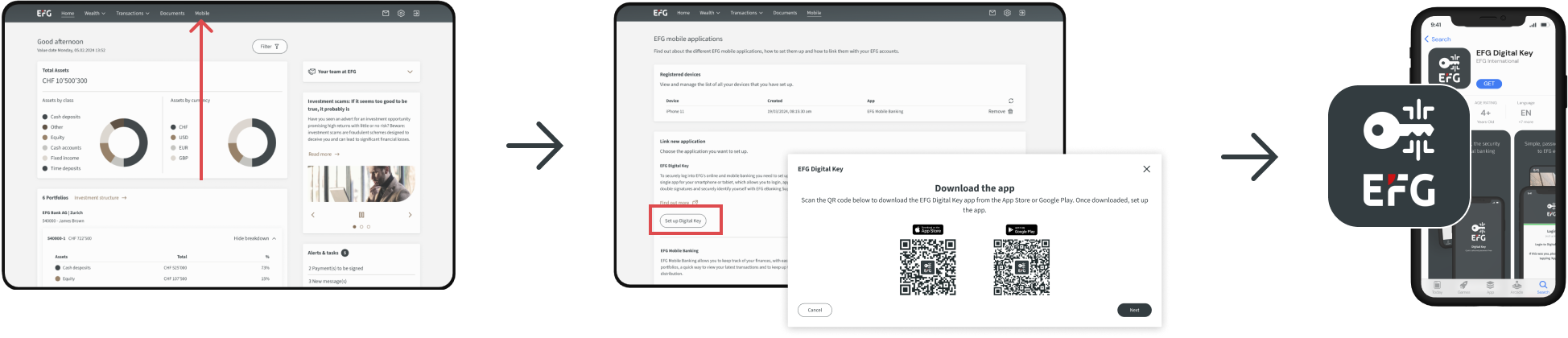
Log into the digital channel using your existing credentials on a desktop or tablet, navigate to Mobile in the top navigation. Follow Step 1, under ‘Link new application’ and download EFG Digital Key by scanning the QR code for the App Store or Google Play. Once downloaded set up the app.
Step1_Existing_V2.png

Step 2
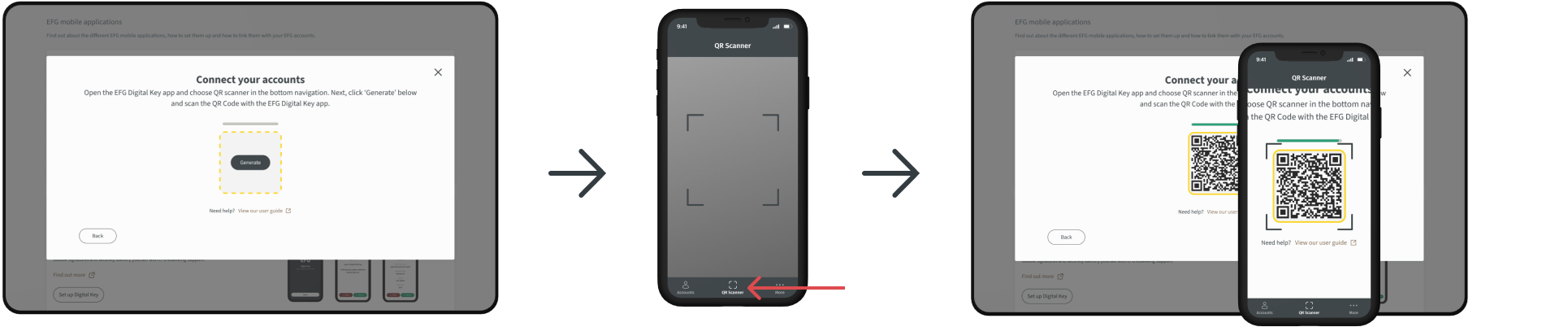
Return to the webpage on your desktop to complete Step 2. Click ‘Generate’ and a QR code will appear.With your EFG Digital Key app, tap ‘QR scanner’ in the bottom navigation and point the camera at the QR code on the desktop. Once scanned successfully, your banking accounts will now be linked to EFG Digital Key, and you will use your EFG Digital Key app every time you login to the digital channel. 

Step2_Existing_V2.png

Need help? Follow the steps in our short video
A step-by-step video to help you get set-up with EFG Digital Key and then log into the digital channel.

Need help with eBanking? Get in touch

Having problems with our eBanking service? Get in touch with our technical team.

eBanking for clients: 
Monday-Friday 8:00 - 18:30 CET
Phone: +41 800 334 334 / +41 58 809 4001*

To find a local free phone number for your country please view our international directory

eBanking for Independent Asset Managers
Monday-Friday 8:00 - 18:30 CET
Phone: +41 58 809 3999

* charges may apply

Search

Personalise your content

Let us know where you’re located so we can tailor our information to make your experience more relevant.

Your regional contact:

  • EFG Bank AG
    Bleicherweg 8
    P.O. Box 6012 - 8022 Zurich
  • +41 44 226 17 17
Close
Close